Getting a brand-new smartphone like the Samsung Galaxy S26 can be both exciting and a bit confusing, especially if you’re new to Galaxy devices. Don’t worry! The Galaxy S26 manual PDF is your best friend when it comes to learning how to use your phone, configure its settings, and discover all the cool hidden features Samsung has packed into this model. This beginner-friendly guide will show you how to find, download, and use the official Samsung S26 manual like a pro.
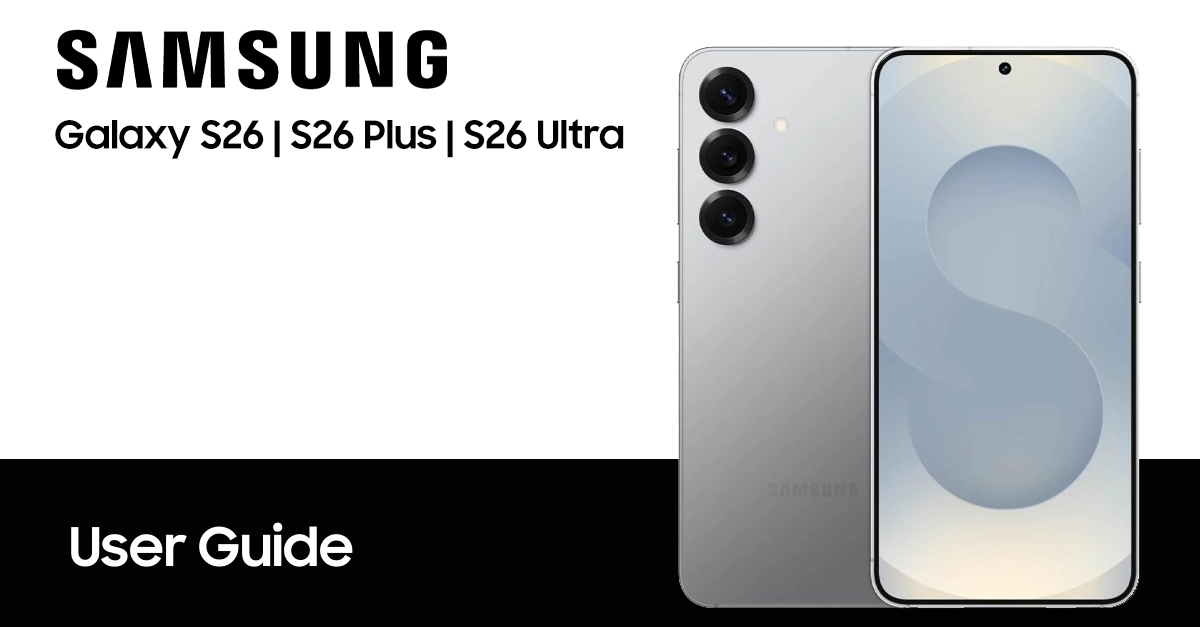
How to find and download the Samsung Galaxy S26 manual PDF
Finding the Samsung Galaxy S26 manual is simple and free. Samsung offers official user manuals in PDF format on its support website. To download the Samsung S26 user manual, you can find on the table listed below.
Note: This user manual is taken from Samsung’s official website; we have simply compiled to make it easier to download in your preferred language.
| Country | Version | Model Numbers | Language | Download |
|---|---|---|---|---|
| Global - Unlocked | Galaxy S26 | SM-S942B/DS | English | Download |
| Galaxy S26 Plus | SM-S947B/DS | Download | ||
| Galaxy S26 Ultra | SM-S948B/DS | Download | ||
| Albania | Galaxy S26 | SM-S942B/DS | Albanian | Download |
| Galaxy S26 Plus | SM-S947B/DS | Download | ||
| Galaxy S26 Ultra | SM-S948B/DS | Download | ||
| Australia | Galaxy S26 | SM-S942B/DS | English | Download |
| Galaxy S26 Plus | SM-S947B/DS | Download | ||
| Galaxy S26 Ultra | SM-S948B/DS | Download | ||
| Brazil | Galaxy S26 | SM-S942B/DS | Português | Download |
| Galaxy S26 Plus | SM-S947B/DS | Download | ||
| Galaxy S26 Ultra | SM-S948B/DS | Download | ||
| Bulgaria | Galaxy S26 | SM-S942B/DS | Български | Download |
| Galaxy S26 Plus | SM-S947B/DS | Download | ||
| Galaxy S26 Ultra | SM-S948B/DS | Download | ||
| Canada | Galaxy S26 | SM-S942W | English | Download |
| Galaxy S26 Plus | SM-S947W | Download | ||
| Galaxy S26 Ultra | SM-S948W | Download | ||
| Canada | Galaxy S26 | SM-S942W | Français | Download |
| Galaxy S26 Plus | SM-S947W | Download | ||
| Galaxy S26 Ultra | SM-S948W | Download | ||
| China | Galaxy S26 | SM-S9420 | 中文 | Download |
| Galaxy S26 Plus | SM-S9470 | Download | ||
| Galaxy S26 Ultra | SM-S9480 | Download | ||
| Croatia | Galaxy S26 | SM-S942B/DS | Hrvatski | Download |
| Galaxy S26 Plus | SM-S947B/DS | Download | ||
| Galaxy S26 Ultra | SM-S948B/DS | Download | ||
| Česká republika | Galaxy S26 | SM-S942B/DS | Čeština | Download |
| Galaxy S26 Plus | SM-S947B/DS | Download | ||
| Galaxy S26 Ultra | SM-S948B/DS | Download | ||
| Danmark | Galaxy S26 | SM-S942B/DS | Dansk | Download |
| Galaxy S26 Plus | SM-S947B/DS | Download | ||
| Galaxy S26 Ultra | SM-S948B/DS | Download | ||
| Estonian | Galaxy S26 | SM-S942B/DS | Eesti | Download |
| Galaxy S26 Plus | SM-S947B/DS | Download | ||
| Galaxy S26 Ultra | SM-S948B/DS | Download | ||
| Europe | Galaxy S26 | SM-S942B/DS | English | Download |
| Galaxy S26 Plus | SM-S947B/DS | Download | ||
| Galaxy S26 Ultra | SM-S948B/DS | Download | ||
| Finland | Galaxy S26 | SM-S942B/DS | Finnish | Download |
| Galaxy S26 Plus | SM-S947B/DS | Download | ||
| Galaxy S26 Ultra | SM-S948B/DS | Download | ||
| France | Galaxy S26 | SM-S942B/DS | Français | Download |
| Galaxy S26 Plus | SM-S947B/DS | Download | ||
| Galaxy S26 Ultra | SM-S948B/DS | Download | ||
| German | Galaxy S26 | SM-S942B/DS | Germany | Download |
| Galaxy S26 Plus | SM-S947B/DS | Download | ||
| Galaxy S26 Ultra | SM-S948B/DS | Download | ||
| Greece | Galaxy S26 | SM-S942B/DS | Greek | Download |
| Galaxy S26 Plus | SM-S947B/DS | Download | ||
| Galaxy S26 Ultra | SM-S948B/DS | Download | ||
| Hongkong | Galaxy S26 | SM-S9420 | Traditional Chinese | Download |
| Galaxy S26 Plus | SM-S9470 | Download | ||
| Galaxy S26 Ultra | SM-S9480 | Download | ||
| Hungary | Galaxy S26 | SM-S942B/DS | Magyar/Hungarian | Download |
| Galaxy S26 Plus | SM-S947B/DS | Download | ||
| Galaxy S26 Ultra | SM-S948B/DS | Download | ||
| India | Galaxy S26 | SM-S942B/DS | Bengali | Download |
| Galaxy S26 Plus | SM-S947B/DS | Download | ||
| Galaxy S26 Ultra | SM-S948B/DS | Download | ||
| Indonesia | Galaxy S26 | SM-S942B/DS | Bahasa Indonesia | Download |
| Galaxy S26 Plus | SM-S947B/DS | Download | ||
| Galaxy S26 Ultra | SM-S948B/DS | Download | ||
| Israel | Galaxy S26 | SM-S942B/DS | Hebrew | TBA |
| Galaxy S26 Plus | SM-S947B/DS | TBA | ||
| Galaxy S26 Ultra | SM-S948B/DS | TBA | ||
| Italia | Galaxy S26 | SM-S942B/DS | Italiano | Download |
| Galaxy S26 Plus | SM-S947B/DS | Download | ||
| Galaxy S26 Ultra | SM-S948B/DS | Download | ||
| Korea | Galaxy S26 | SM-S942N | 한국어 | Download |
| Galaxy S26 Plus | SM-S947N | Download | ||
| Galaxy S26 Ultra | SM-S948N | Download | ||
| Laos | Galaxy S26 | SM-S942B/DS | ພາສາລາວ | Download |
| Galaxy S26 Plus | SM-S947B/DS | Download | ||
| Galaxy S26 Ultra | SM-S948B/DS | Download | ||
| Latin America | Galaxy S26 | SM-S942B/DS | Spanish/Español | Download |
| Galaxy S26 Plus | SM-S947B/DS | Download | ||
| Galaxy S26 Ultra | SM-S948B/DS | Download | ||
| Latvia | Galaxy S26 | SM-S942B/DS | Latviešu | Download |
| Galaxy S26 Plus | SM-S947B/DS | Download | ||
| Galaxy S26 Ultra | SM-S948B/DS | Download | ||
| Lithuania | Galaxy S26 | SM-S942B/DS | Lietuvių | Download |
| Galaxy S26 Plus | SM-S947B/DS | Download | ||
| Galaxy S26 Ultra | SM-S948B/DS | Download | ||
| Macedonia | Galaxy S26 | SM-S942B/DS | Mакедонски | Download |
| Galaxy S26 Plus | SM-S947B/DS | Download | ||
| Galaxy S26 Ultra | SM-S948B/DS | Download | ||
| Middle East | Galaxy S26 | SM-S942B/DS | Arabic | Download |
| Galaxy S26 Plus | SM-S947B/DS | Download | ||
| Galaxy S26 Ultra | SM-S948B/DS | Download | ||
| Middle East | Galaxy S26 | SM-S942B/DS | Farsi | TBA |
| Galaxy S26 Plus | SM-S947B/DS | TBA | ||
| Galaxy S26 Ultra | SM-S948B/DS | TBA | ||
| Nederlands | Galaxy S26 | SM-S942B/DS | Nederlands | Download |
| Galaxy S26 Plus | SM-S947B/DS | Download | ||
| Galaxy S26 Ultra | SM-S948B/DS | Download | ||
| Myanmar | Galaxy S26 | SM-S942B/DS | Burmese | Download |
| Galaxy S26 Plus | SM-S947B/DS | Download | ||
| Galaxy S26 Ultra | SM-S948B/DS | Download | ||
| New Zealand | Galaxy S26 | SM-S942B/DS | English | Download |
| Galaxy S26 Plus | SM-S947B/DS | Download | ||
| Galaxy S26 Ultra | SM-S948B/DS | Download | ||
| Norwegia | Galaxy S26 | SM-S942B/DS | Norsk | Download |
| Galaxy S26 Plus | SM-S947B/DS | Download | ||
| Galaxy S26 Ultra | SM-S948B/DS | Download | ||
| Pakistan | Galaxy S26 | SM-S942B/DS | Urdu | TBA |
| Galaxy S26 Plus | SM-S947B/DS | TBA | ||
| Galaxy S26 Ultra | SM-S948B/DS | TBA | ||
| Poland | Galaxy S26 | SM-S942B/DS | Język polski | Download |
| Galaxy S26 Plus | SM-S947B/DS | Download | ||
| Galaxy S26 Ultra | SM-S948B/DS | Download | ||
| Portugal | Galaxy S26 | SM-S942B/DS | Português | Download |
| Galaxy S26 Plus | SM-S947B/DS | Download | ||
| Galaxy S26 Ultra | SM-S948B/DS | Download | ||
| Romania | Galaxy S26 | SM-S942B/DS | Română | Download |
| Galaxy S26 Plus | SM-S947B/DS | Download | ||
| Galaxy S26 Ultra | SM-S948B/DS | Download | ||
| Russia | Galaxy S26 | SM-S942B/DS | Русский | Download |
| Galaxy S26 Plus | SM-S947B/DS | Download | ||
| Galaxy S26 Ultra | SM-S948B/DS | Download | ||
| Serbia | Galaxy S26 | SM-S942B/DS | Serbian | Download |
| Galaxy S26 Plus | SM-S947B/DS | Download | ||
| Galaxy S26 Ultra | SM-S948B/DS | Download | ||
| Singapore | Galaxy S26 | SM-S942B/DS | English | Download |
| Galaxy S26 Plus | SM-S947B/DS | Download | ||
| Galaxy S26 Ultra | SM-S948B/DS | Download | ||
| Singapore | Galaxy S26 | SM-S942B/DS | Simplified Chinese | Download |
| Galaxy S26 Plus | SM-S947B/DS | Download | ||
| Galaxy S26 Ultra | SM-S948B/DS | Download | ||
| Slovakia | Galaxy S26 | SM-S942B/DS | Slovak | Download |
| Galaxy S26 Plus | SM-S947B/DS | Download | ||
| Galaxy S26 Ultra | SM-S948B/DS | Download | ||
| Slovenija | Galaxy S26 | SM-S942B/DS | Slovene | Download |
| Galaxy S26 Plus | SM-S947B/DS | Download | ||
| Galaxy S26 Ultra | SM-S948B/DS | Download | ||
| South East Asia | Galaxy S26 | SM-S942B/DS | English | Download |
| Galaxy S26 Plus | SM-S947B/DS | Download | ||
| Galaxy S26 Ultra | SM-S948B/DS | Download | ||
| South East Asia | Galaxy S26 | SM-S942B/DS | Simplified Chinese | Download |
| Galaxy S26 Plus | SM-S947B/DS | Download | ||
| Galaxy S26 Ultra | SM-S948B/DS | Download | ||
| Spain | Galaxy S26 | SM-S942B/DS | Español | Download |
| Galaxy S26 Plus | SM-S947B/DS | Download | ||
| Galaxy S26 Ultra | SM-S948B/DS | Download | ||
| Sweden | Galaxy S26 | SM-S942B/DS | Svenska | Download |
| Galaxy S26 Plus | SM-S947B/DS | Download | ||
| Galaxy S26 Ultra | SM-S948B/DS | Download | ||
| Taiwan | Galaxy S26 | SM-S942B/DS | Traditional Chinese | Download |
| Galaxy S26 Plus | SM-S947B/DS | Download | ||
| Galaxy S26 Ultra | SM-S948B/DS | Download | ||
| Thailand | Galaxy S26 | SM-S942B/DS | Thai | Download |
| Galaxy S26 Plus | SM-S947B/DS | Download | ||
| Galaxy S26 Ultra | SM-S948B/DS | Download | ||
| Turkey | Galaxy S26 | SM-S942B/DS | Turkish | Download |
| Galaxy S26 Plus | SM-S947B/DS | Download | ||
| Galaxy S26 Ultra | SM-S948B/DS | Download | ||
| Ukraina | Galaxy S26 | SM-S942B/DS | Ukrainian | Download |
| Galaxy S26 Plus | SM-S947B/DS | Download | ||
| Galaxy S26 Ultra | SM-S948B/DS | Download | ||
| United Kingdom | Galaxy S26 | SM-S942B/DS | English | Download |
| Galaxy S26 Plus | SM-S947B/DS | Download | ||
| Galaxy S26 Ultra | SM-S948B/DS | Download | ||
| US – AT&T | Galaxy S26 | SM-S942U | English | Download |
| Galaxy S26 Plus | SM-S947U | Download | ||
| Galaxy S26 Ultra | SM-S948U | Download | ||
| US – Metro PCS | Galaxy S26 | SM-S942U | English | Download |
| Galaxy S26 Plus | SM-S947U | Download | ||
| Galaxy S26 Ultra | SM-S948U | Download | ||
| US – Cricket | Galaxy S26 | SM-S942U | English | Download |
| Galaxy S26 Plus | SM-S947U | Download | ||
| Galaxy S26 Ultra | SM-S948U | Download | ||
| US – Cricket | Galaxy S26 | SM-S942U | Spanish/Español | Download |
| Galaxy S26 Plus | SM-S947U | Download | ||
| Galaxy S26 Ultra | SM-S948U | Download | ||
| US – US Cellular | Galaxy S26 | SM-S942U | English | Download |
| Galaxy S26 Plus | SM-S947U | Download | ||
| Galaxy S26 Ultra | SM-S948U | Download | ||
| US – Verizon | Galaxy S26 | SM-S942U | English | Download |
| Galaxy S26 Plus | SM-S947U | Download | ||
| Galaxy S26 Ultra | SM-S948U | Download | ||
| Vietnam | Galaxy S26 | SM-S942B/DS | Tiếng Việt Nam | Download |
| Galaxy S26 Plus | SM-S947B/DS | Download | ||
| Galaxy S26 Ultra | SM-S948B/DS | Download | ||
NOTE: For reading this manual, your computer required Adobe Reader apps. You can get the Adobe Reader for free by going here https://get.adobe.com/reader/.
How to access the Samsung S26 manual from your device
Samsung makes it extremely simple to access your phone’s manual directly from the device itself. You can view it right on your S26 device.
Here’s how:
- On your Samsung S26, open Settings.
- Scroll down and look for User Manual, Help, or Tips and User Guide.
- Tap to open, and follow the on-screen instructions to access it.
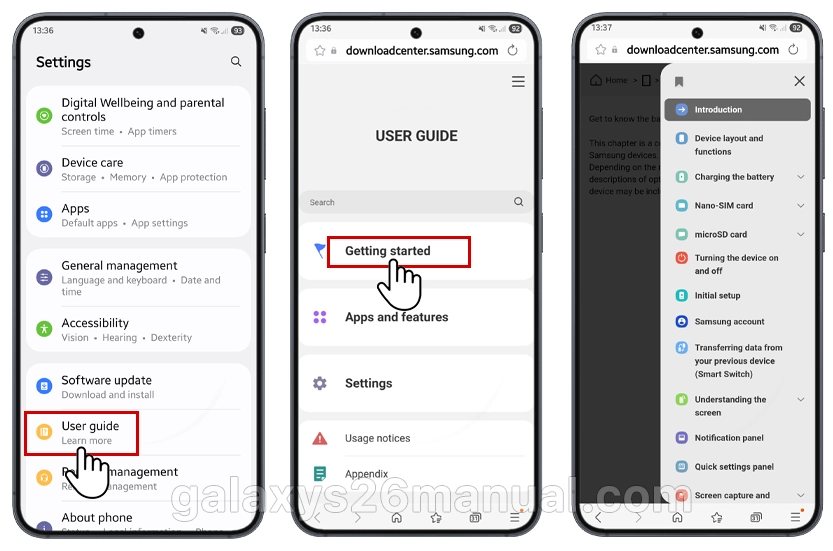
The manual covers essential topics such as setup, navigation, camera use, and security features, all written in beginner-friendly language.
What you’ll find in the Samsung S26 user guide
Once downloaded, the Samsung S26 user guide PDF provides detailed step-by-step instructions and visuals. Here’s a sneak peek at what’s inside:
- Device Setup: How to insert your SIM card, charge the phone, and power it on and also power off your device.
- Samsung Account: Learn how to register your device and unlock the full Samsung ecosystem.
- Fast Charging Tips: Keep your device ready to go using Samsung Adaptive Fast Charging.
- Security Settings: Discover how to use face unlock, fingerprint sensor, and Samsung Pass.
- Navigation & Gestures: Tips on using One UI efficiently with multitasking tricks.
- Troubleshooting Basics: Solutions for common issues like Wi-Fi or battery concerns.
It’s designed to help beginners understand every function easily without needing expert technical knowledge.
Why you should download the PDF version
Having the Samsung S26 user manual in PDF format is convenient because you can open it anytime, even without the internet. Whether you’re traveling or just customizing your phone, the offline manual will make life easier. It’s also searchable, so you can find topics fast.
Just save it on your device, in cloud storage, or on your computer for quick reference.
Tips for beginners using the Samsung Galaxy S26
Once you’ve got your manual, here are a few beginner tips to make the most out of your phone:
- Enable Adaptive Battery to extend performance throughout the day.
- Use Smart Switch to transfer data from old devices easily.
- Customize Edge Panels for instant access to your favorite apps.
- Explore Modes & Routines to automate tasks and save time.
Every one of these features is explained step-by-step in the Samsung S26 user guide PDF.
FAQ for Samsung Galaxy S26 manual
- Question 1: What is included in the Samsung S26 manual for beginners?
- Answer: The Galaxy S26 manual covers essential setup steps, navigation tips for One UI, customization options, camera modes, and troubleshooting basics ideal for new Samsung users.
- Question 2: How can I download the official Galaxy S26 user guide?
- Answer: You can download the official Galaxy S26 manual from Samsung Support’s S Series User Manual page for guides and updates.
- Question 3: What are the key new features of the Galaxy S26?
- Answer: The Galaxy S26 introduces a slimmer design, upgraded Snapdragon and Exynos chipsets, Qi2 wireless charging support, enhanced display brightness with depolarizer technology, and refined camera sensors for improved performance.
- Question 4: Does the Galaxy S26 support fast charging?
- Answer: Yes, the Galaxy S26 supports up to 45W fast charging, and the Galaxy S26 Ultra variant may offer up to 65W for faster power-ups.
- Question 5: What version of Android and One UI does the Galaxy S26 run?
- Answer: The Galaxy S26 launches with Android 16 and Samsung’s One UI 8.5 interface, offering advanced Galaxy AI features and improved performance for beginners.
Conclusion
The Samsung Galaxy S26 manual and user guide PDF isn’t just a manual—it’s your roadmap to mastering your device. From setup to security, it walks you through everything in a clear, friendly way perfect for beginners. Download it today, keep it handy, and explore what your Samsung Galaxy S26 can really do.
gratias tibi agimus quod ducem lingua nostra praebuisti. salutem optimam ex mexico.