Direct Voicemail revolutionizes how you handle incoming calls on the Samsung S26 series. Unlike traditional voicemail that requires dialing a code, this feature sends callers straight to an on-device recording system during a call or after a short delay. This article will help you to enable Direct Voicemail on your Galaxy S26.

Powered by Galaxy AI, it provides real-time transcription, so you see the message as it’s being left and can even pick up mid-recording if needed. It’s privacy-focused, storing everything locally without relying on carrier services in most cases, and works seamlessly alongside call screening and live translate.
Perfect for busy days, it appears in the “More options” menu during calls, ensuring you never miss important details again.
Prerequisites for Setup
Before enabling Direct Voicemail, confirm your Galaxy S26 runs One UI 8.5 or later; this feature launched with it for optimal S26 performance. Check and update via Settings > Software update.

You’ll need an active SIM card, call forwarding enabled (for auto-options), and at least 100MB free storage for messages. Disable any carrier visual voicemail apps to prevent conflicts, and connect to Wi-Fi for smoother initial setup, though it’s optional.
Test readiness by having a friend call you to ensure a strong signal and no Airplane Mode active.
Step-by-Step to Enable Direct Voicemail on Galaxy S26
Setting up Direct Voicemail on your Galaxy S26 is super straightforward and takes just minutes. Open the Phone app, tap the three-dot menu in the top right, then select Settings.
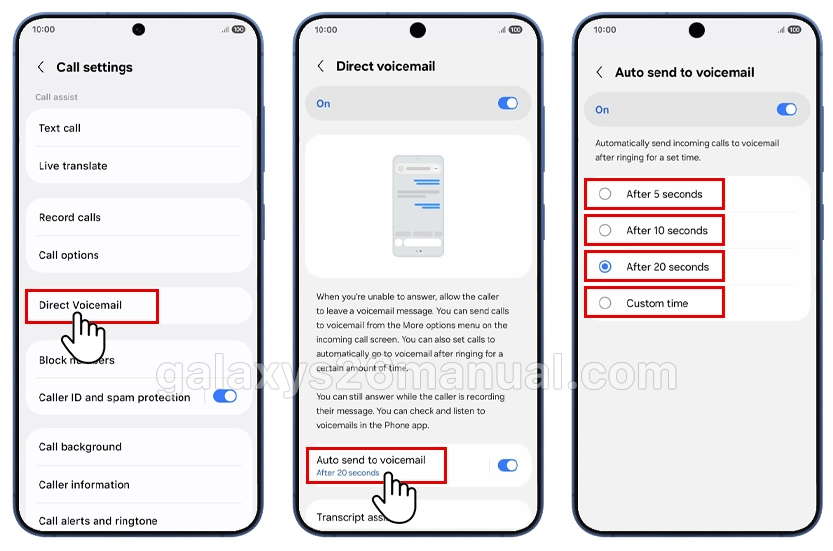
Find Direct Voicemail and toggle it on. Customize the auto-forward timer options to include 5, 10, or 20 seconds, or a custom delay for hands-free bliss. For manual control, during an incoming call, swipe up on the screen, tap the voicemail icon, and the caller goes directly to recording.
Save changes, then test by calling yourself from another phone. You’ll see live transcription pop up, play, read, or answer instantly! Samsung’s system often overrides carrier voicemail for better privacy.

Cool Features and AI Magic
Real-time transcription is the highlight, turning speech to text so you can skim and respond fast and even interrupt to answer urgent calls. AI summaries condense long messages into key points, while noise removal ensures clear audio every time.
Messages appear in your recent calls list with a voicemail icon for easy access—play audio, view transcripts, or use summaries, all on-device. Paired with the Galaxy S26’s powerful processor, it shines in low-signal spots too.
For extra smarts, integrate with Bixby Text Call for AI screening before voicemail.
Everyday Benefits and Use Cases
Picture this: You’re driving or in back-to-back meetings. Direct Voicemail auto-routes calls after your set delay, capturing details without disturbance. Professionals love quick transcript scans, parents appreciate family updates at a glance, and it saves on carrier fees.
Customize per contact: Auto-send spam or unknowns to voicemail via phone settings. Pair with Do Not Disturb for silent mode, allowing favorites through, ideal for work-life balance. It’s a thoughtful upgrade for multitaskers, seniors, and anyone seeking efficient communication.
Troubleshooting Common Issues
If Direct Voicemail doesn’t appear, ensure the One UI 8.5 update and carrier compatibility—toggle Airplane Mode to reset.
Lagging transcription? Clear Phone app cache: Settings > Apps > Phone > Storage > Clear cache.
No notifications? Check Settings > Apps > Phone > Notifications and enable them. Back up via Samsung Cloud, and if issues persist, contact Samsung support or verify SIM forwarding with *#61#.
For unlocked devices, manually add the voicemail number in settings if needed.
Advanced Tips for Power Users
Set contact-specific rules to auto-voicemail unknowns, boosting spam protection. Combine with Galaxy AI for transcribed summaries in notifications read without opening the app.
Enable voicemail in call forwarding: Phone app > Settings > Supplementary services > Call forwarding > Voice call > Always forward (enter carrier voicemail number if prompted). Record a custom greeting via the traditional setup first (long-press 1 on the keypad) for a personal touch.

Regularly delete old messages to free space, and explore the Galaxy Store for visual voicemail enhancers if your carrier supports them.
There you have it. Direct Voicemail turns your Galaxy S26 into a proactive communication hub, blending friendly AI with seamless setup for hassle-free messaging. Whether juggling a hectic schedule or just wanting smarter calls, this feature keeps you connected on your terms.
i have One UI 8.5 but it does not have the option change the direct voicemail greeting?