The Galaxy S26 runs One UI 8.5 on Android 16, featuring advanced visual voicemail for easy message management. Unlike traditional dial-in systems, visual voicemail lets you see, play, and delete messages directly in the Phone app without calling a number. This article will guide you to set up voicemail on your Galaxy S26, which keeps you connected even when you can’t answer calls.

Carrier support varies, like Verizon, AT&T, and T-Mobile, offer integrated visual voicemail on Galaxy S26. Unlocked devices may need manual setup via carrier apps or settings.
Key benefits include instant transcripts, customizable notifications, and AI-powered spam filtering powered by Samsung’s Galaxy AI.
What You Need Before Starting
Before you begin the Samsung S26 voicemail setup, ensure you have:
- An active SIM card with voicemail service enabled by your carrier.
- A stable mobile network connection (not Wi-Fi calling).
- Your Samsung Galaxy S26 powered on and updated to One UI 8.5 or later.
- A quiet environment if you plan to record a custom greeting.
Note: Voicemail features vary by carrier. Some carriers include visual voicemail by default; others charge extra or require app downloads.
Steps to Set Up Voicemail on Galaxy S26 via Phone App
Follow these easy steps to activate voicemail on your Galaxy S26. This method works for most carriers.
- Open the Phone app from your home screen or app drawer.
- Tap the dialpad icon (keypad at bottom).
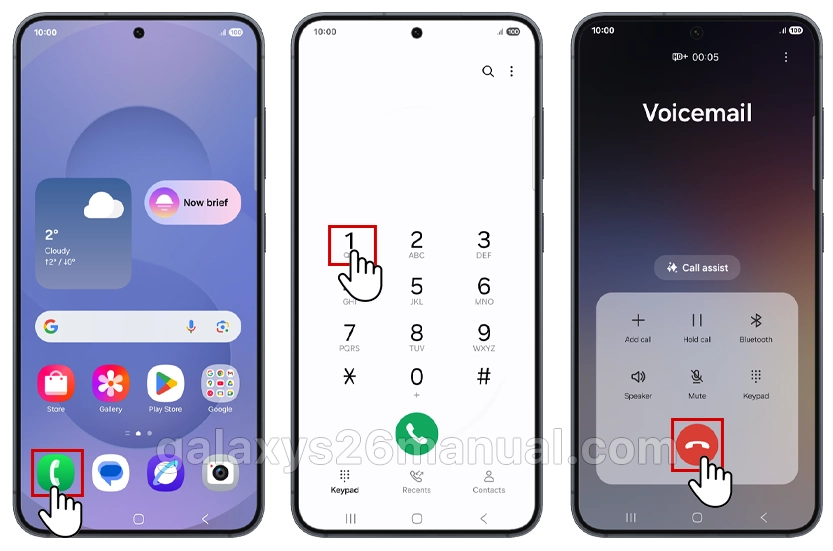
- Press and hold the 1 key until it dials—this auto-connects to voicemail setup. Follow voice prompts to create a password (4-7 digits; avoid 0000 or 1234) and record a greeting.
- If prompted, enter your carrier’s voicemail number.
Pro Tip: Enable visual voicemail immediately after. In the Phone app, go to the three-dot menu > Settings > Voicemail > Visual voicemail (toggle on).
Test by calling yourself from another phone—leave a message and check playback.
Save and Manage Voicemail Number
Customizing your voicemail number ensures reliable access on the Galaxy S26.
- Launch the Phone app.
- Tap three dots (More) > Settings.
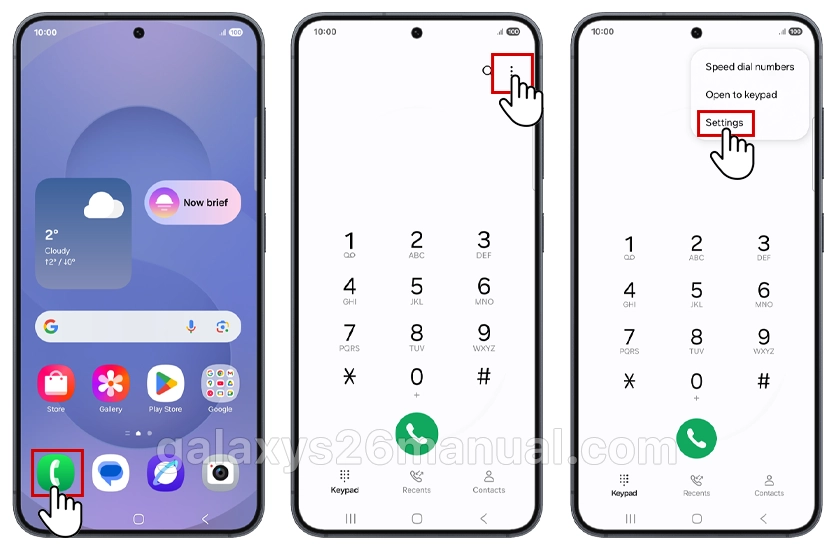
- Scroll to Voicemail > Voicemail number.
- Enter your carrier’s number (e.g., 901) > OK.

| Carrier | Default Voicemail Number | Visual Voicemail App |
|---|---|---|
| Verizon | *86 | Built-in |
| AT&T | 1 | AT&T Visual Voicemail |
| T-Mobile | 1 or 805 | T-Mobile Visual Voicemail |
| Unlocked/Global | Varies (check SIM) | Samsung Phone app |
For carrier-specific apps like Visual Voicemail by Verizon, download from the Galaxy Store or Google Play Store and sign in.
Update call forwarding too: Dial ##004# to forward unanswered calls to voicemail.
Customize Greetings and Password
Personalize your Galaxy S26 voicemail to stand out.
Record Greeting:
- Dial voicemail (hold 1).
- Press 3 for settings > 1 for greeting.
- Choose 1 (record new) > speak clearly: “Hi, this is [Name]. Leave a message!” > # to save.
Password Setup:
- During initial setup or via settings: Choose a strong combo (e.g., birthday + PIN).
- Enable password in Phone Settings > Voicemail > Voicemail password.
Friendly Tip: Keep greetings under 30 seconds. Test playback for clarity on S26’s high-quality speakers.
Direct Voicemail (New in One UI 8.5)
The Samsung Galaxy S26 introduces an upgraded Direct Voicemail feature exclusive to devices running One UI 8.5 and Android 16. This allows callers to leave messages even while you’re screening the call, with live transcription.
How to Enable Direct Voicemail
- Open the Phone app.
- Tap the More options icon (three dots) → Settings.
- Tap Direct voicemail.
- Toggle the switch at the top to ON.
Configure Auto Send to Voicemail
- In the Direct voicemail menu, tap Auto send to voicemail.
- Toggle it ON.
- Set your preferred ring duration before calls divert to voicemail (e.g., 15, 20, or 30 seconds).
Enable Transcript Assist
With Transcript assist enabled, you can:
- See what callers are saying while they record the voicemail.
- Read transcripts on your lock screen without listening.
- Save transcripts to Samsung Reminders for follow-up.
Important: Direct Voicemail requires your phone to be powered on and connected to the mobile network. It does not work for video calls or when storage is nearly full.
Advanced Features on Galaxy S26
Leverage Galaxy S26 exclusives:
- AI Transcripts: Auto-transcribe messages in direct voicemail (One UI 8.5).
- Notifications: Settings > Notifications > Phone > Customize sounds/vibrations for missed calls/voicemails.
- Multi-Message Management: Swipe to delete/archive in visual view.
- Integration with Bixby: Say “Check my voicemails” for hands-free access.
Enable Circle to Search for quick voicemail tips right from your screen.
Troubleshooting: Voicemail Not Working?
If your Samsung S26 voicemail isn’t working properly, try these fixes:
Can’t Access Voicemail?
- Verify carrier activation: Contact your carrier to confirm voicemail is active on your plan.
- Check the voicemail number: Go to Phone app → Settings → Voicemail and ensure the number matches your carrier’s specification.
- Reset password: If forgotten, contact your carrier—there is no self-service recovery option.
Visual Voicemail Not Showing?
- Confirm your plan includes visual voicemail (some carriers charge extra).
- Check for app updates in the Galaxy Store.
- Ensure you have adequate mobile data or Wi-Fi connection.
Not Receiving Voicemail Notifications?
- Go to Settings → Notifications → Phone → Voicemail notifications and ensure they’re enabled.
- Disable Battery Saver or Power Saving mode, which may delay notifications.
- Restart your Samsung S26 to refresh the network connection.
Direct Voicemail Not Working?
- Confirm your device is running One UI 8.5 or higher.
- Ensure you have sufficient internal storage.
- Verify you’re not on a video call (Direct Voicemail doesn’t support video).
- Check that you’re connected to your mobile network, not Wi-Fi only.
Tips for Daily Use and Security
- Security: Use biometric lock for voicemail (Settings > Biometrics).
- Storage: Auto-delete old messages after 30 days.
- Backup: Sync to Samsung Cloud or Google Drive.
- Accessibility: Enable voice-to-text for seniors or hands-free users.
Final Thoughts
Setting up voicemail on your Samsung Galaxy S26 takes just a few minutes, but it ensures you stay connected even when you can’t answer. Whether you prefer the simplicity of basic voicemail, the convenience of visual voicemail, or the cutting-edge Direct Voicemail with AI transcription, your S26 has you covered.
If you run into issues, remember that your carrier is your best resource for account-specific problems. For device-related questions, Samsung Support and the Samsung Members app are excellent next steps.
Did this guide help? Share it with fellow S26 owners and bookmark it for future reference.
I would like a PRiNTED copy of S26 -SM-S942U. I’m really new to this phone ad REALLY confused. I’m 74 and need help. retrieving voicemails shouldn’t be that difficult. Help?