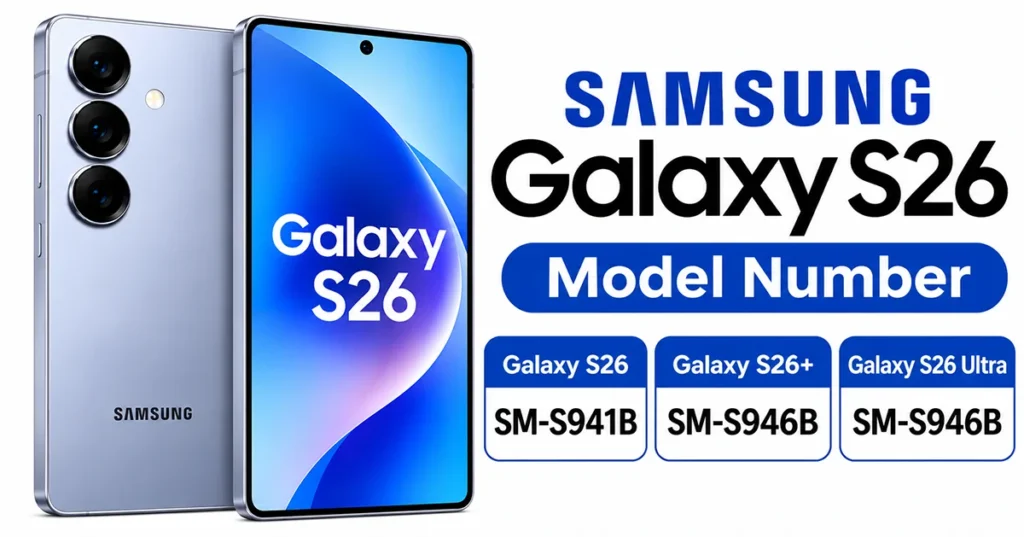
The Galaxy S26 model number identifies which Samsung Galaxy S26 device you own, including its standard, Plus, or Ultra version and its regional configuration. The standard Galaxy S26 uses the model number SM-S942, the Galaxy S26+ uses SM-S947, and the Galaxy S26 Ultra uses SM-S948.
You can check the exact model number by opening Settings > About phone on your Samsung device. Knowing this information helps you download the correct user manual, check compatibility, verify warranty information, and find device-specific support.
What Is the Galaxy S26 Model Number?
The Samsung Galaxy S26 model number is a unique product identifier assigned to a particular device model or regional variant. It usually begins with the letters and numbers SM-S, followed by a series of digits and sometimes additional characters.
For the Galaxy S26 lineup, Samsung uses three main model identifiers:
- Galaxy S26: SM-S942
- Galaxy S26+: SM-S947
- Galaxy S26 Ultra: SM-S948
These identifiers distinguish the three smartphones in the Galaxy S26 family. Additional letters and numbers may appear in the complete model code, depending on the country, carrier, storage configuration, and product variant.
For example, Samsung’s Australia support website identifies the Galaxy S26 Ultra as SM-S948B/DS. This is a regional device designation rather than simply the shortened SM-S948 identifier.
Galaxy S26, S26+, and S26 Ultra Model Numbers
If you are looking for your phone’s model number, use the following table to identify your device.
| Samsung smartphone | Base model number | Example designation |
|---|---|---|
| Galaxy S26 | SM-S942 | SM-S942B/DS |
| Galaxy S26+ | SM-S947 | SM-S947B/DS |
| Galaxy S26 Ultra | SM-S948 | SM-S948B/DS |
The table provides the main model identifiers and an example of an international dual-SIM designation. Exact model codes can differ between markets.
Galaxy S26 (SM-S942)
The standard Galaxy S26 uses the SM-S942 model identifier. It is the regular version of the Galaxy S26 lineup, designed for people who prefer a more compact smartphone.
Depending on the market, the full model designation may include additional letters, such as SM-S942B or SM-S942B/DS.
Galaxy S26+ (SM-S947)
The Galaxy S26+ uses the SM-S947 model identifier. It is the larger version of the standard Galaxy S26, with a bigger display and battery.
Its complete model number can include regional identifiers, such as SM-S947B/DS.
Galaxy S26 Ultra (SM-S948)
The Galaxy S26 Ultra uses the SM-S948 model identifier. It is the premium model in the S26 family, featuring a larger display, advanced camera capabilities, and S Pen support.
For example, Samsung Australia lists the Galaxy S26 Ultra as SM-S948B/DS.
How to Check Your Galaxy S26 Model Number
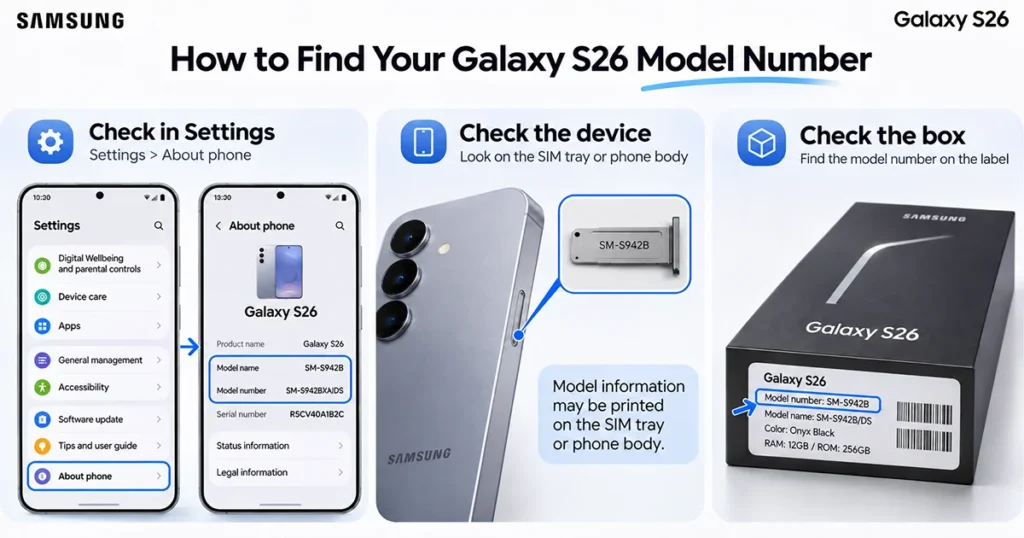
You do not need to install an additional application to find your Samsung Galaxy S26 model number. The information is available directly in the phone’s settings.
Follow these steps:
- Open the Settings app on your Galaxy S26.
- Scroll down and tap About phone.
- Find the Model number section.
- Check the displayed model number.
- Write it down if you need it for support, warranty verification, or manual downloads.
Your device may display a shortened model number or a more detailed regional designation.
Other Ways to Find Your Samsung Model Number
If you cannot access the Settings menu, there are alternative ways to identify your device.
1. Check the original packaging
Look at the product label on the original Samsung Galaxy S26 box. It usually contains the model code, serial number, IMEI, and other product information.
2. Use the Samsung Members app
Open Samsung Members and navigate to the device support or product information section. Depending on your registration and app version, you can find information about your registered Galaxy device.
3. Visit Samsung Support
You can use Samsung’s official support website to search for your device using its model number or product information.
Always compare the information with the details displayed on your phone when possible.
What Do Samsung Galaxy S26 Model Numbers Mean?
Samsung model numbers contain letters and numbers that help distinguish device families and variants.
For example, consider the model designation SM-S948B/DS:
| Code | Meaning |
|---|---|
| SM | Samsung mobile product identifier |
| S | Galaxy S series |
| 948 | Galaxy S26 Ultra model identifier |
| B | Regional hardware variant |
| /DS | Dual SIM designation |
The additional characters in a complete Samsung product code can also identify a specific sales configuration, such as color, storage capacity, or market.
It is important to remember that not every character has a universal meaning across every Samsung product generation. Always check the complete code against Samsung’s regional support information.
Galaxy S26 Regional Model Number Differences
Samsung may release different model variants depending on the country or mobile network.
For example, Samsung’s published product information identifies the Galaxy S26 family with different regional suffixes. The SM-S942U identifier is associated with the US Galaxy S26, while SM-S942B is used for UK-market listings.
The same naming pattern applies to the other devices:
- Galaxy S26: SM-S942U or SM-S942B
- Galaxy S26+: SM-S947U or SM-S947B
- Galaxy S26 Ultra: SM-S948U or SM-S948B
These are examples, not a complete list of every regional or carrier variant.
Regional differences can affect supported network bands, SIM configurations, processor availability, and software or carrier features. Therefore, do not assume that two phones with the same Galaxy S26 name are identical in every market.
Before purchasing a replacement phone, importing a device, or installing firmware, verify the exact model designation and regional compatibility.
Model Number vs. IMEI vs. Serial Number
The model number, IMEI, and serial number are three different identifiers. Although they may appear together in your phone settings, they serve different purposes.
| Identifier | Purpose | Example |
|---|---|---|
| Model number | Identifies the device model or variant | SM-S948B/DS |
| IMEI | Identifies an individual mobile device | 15-digit number |
| Serial number | Identifies an individual Samsung product | Unique letters and numbers |
A model number can be shared by many phones of the same configuration. However, an IMEI and serial number are assigned to individual devices.
You may need your model number when downloading manuals, checking compatible accessories, or requesting technical support. An IMEI is more commonly used for network identification, device registration, and certain warranty or lost-device procedures.
Avoid sharing your full IMEI or serial number publicly because these are individual device identifiers.
Why Do You Need to Know Your Galaxy S26 Model Number?
Knowing your exact Samsung model number can be useful in several situations.
- Downloading the correct manual: Find instructions that match your particular Galaxy S26 model.
- Checking compatibility: Verify network bands, SIM support, and accessories before purchasing.
- Getting technical support: Help Samsung identify your exact device configuration.
- Checking warranty information: Provide accurate product details when requesting warranty assistance.
- Installing firmware: Confirm that software packages are intended for your exact device variant.
- Buying replacement parts: Avoid purchasing components designed for a different Galaxy S26 version.
Checking the model number before performing repairs or installing software can help prevent compatibility problems.
Frequently Asked Questions
The standard Samsung Galaxy S26 uses the base model identifier SM-S942. Its complete model designation may vary by region.
The Samsung Galaxy S26 Ultra uses the SM-S948 model identifier. An example of its international designation is SM-S948B/DS.
The Galaxy S26+ uses the SM-S947 model identifier. Additional characters identify regional or device variants.
Open Settings, select About phone, and look for Model number. You can also check the original retail packaging or Samsung Members.
No. The model number identifies a product model, while the IMEI identifies an individual mobile device. An IMEI is generally a 15-digit number.
Yes. Samsung uses regional and carrier-specific variants. The exact model designation can differ depending on the market and device configuration.
Final Thoughts
The Galaxy S26 model number makes it easier to identify your Samsung smartphone and find the correct support information. Remember the three main identifiers: SM-S942 for the Galaxy S26, SM-S947 for the Galaxy S26+, and SM-S948 for the Galaxy S26 Ultra.
To confirm your exact device variant, open Settings > About phone and check the complete model number. Always use that information when downloading manuals, checking compatibility, or contacting Samsung support.
Reference:
- Samsung – How to find your Samsung model number.
